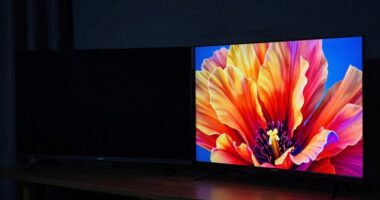

HDR displays transform modern trailer finishing by allowing you to showcase richer colors, brighter highlights, and sharper details. You’ll create visuals that are more vivid, immersive, and emotionally impactful, making your trailers stand out on big screens and streaming platforms. Proper color grading and brightness calibration are vital to fully utilize HDR’s potential. If you want to understand how to maximize these features and deliver stunning trailers, keep exploring the essentials of HDR trailer finishing.

Get movie nights delivered free with Prime
- Fast, free delivery on millions of items
- Prime Video, Amazon Music and more included
- Member-only deals all year
Key Takeaways
- HDR displays enable trailers to showcase a wider color gamut and brighter highlights, enhancing visual impact and immersion.
- Accurate brightness calibration on HDR screens ensures consistent luminance and preserves highlight and shadow detail.
- Proper color grading tailored for HDR maximizes visual vibrancy and emotional engagement in trailers.
- Understanding display capabilities and color gamuts is crucial for maintaining visual fidelity across different screens.
- Meticulous finishing techniques are essential to fully leverage HDR’s dynamic range and deliver striking, high-quality trailers.

High Dynamic Range (HDR) displays have revolutionized how trailers are finished, offering filmmakers and viewers a more vivid and immersive experience. As someone involved in trailer production, you now have access to a broader spectrum of colors and brighter highlights, which markedly enhances visual storytelling. To take full advantage of HDR technology, you need to pay close attention to color grading. This process involves adjusting the colors, contrast, and luminance to make certain that every scene pops with clarity and vibrancy without losing detail in shadows or highlights. Proper color grading in HDR allows you to create a more dynamic and emotionally impactful trailer, making it stand out on the big screen or streaming platform.
Brightness calibration is equally vital in HDR trailer finishing. Unlike standard displays, HDR screens can display a wider range of luminance, so calibrating brightness levels becomes essential to maintain consistency and accuracy across different viewing environments. You want to make certain that the brightest highlights don’t appear washed out or overly harsh, while the darker scenes retain depth and detail. When you calibrate brightness correctly, the trailer’s visual tone remains true to your creative intent, whether it’s a subtle, moody atmosphere or a high-octane action sequence. This calibration process involves measuring and adjusting the display’s luminance output, which helps prevent color clipping and ensures that the HDR effects are rendered properly.
As you work through the finishing process, you’ll find that HDR demands a more meticulous approach to both color grading and brightness calibration. These steps are interconnected: precise color grading enhances the richness of the visuals, while accurate brightness calibration guarantees that those colors are displayed as intended. If these elements aren’t correctly managed, your trailer might look flat or inconsistent across different devices, undermining its visual impact. With HDR, you’re not just enhancing brightness and color but also making sure your visuals translate seamlessly from your editing suite to the viewer’s screen. Additionally, understanding the color gamut of your display is crucial to ensure the full range of colors is accurately represented, further elevating the quality of your trailer. Being aware of the content management practices for HDR also helps maintain the integrity of your visuals across various platforms and devices. Incorporating color management best practices allows for a more reliable and predictable finishing process.
In essence, HDR displays challenge you to refine your finishing techniques, pushing you towards more accurate, nuanced color grading and brightness calibration. When done right, this attention to detail results in trailers that are more striking, immersive, and true to your creative vision. You’re no longer limited by the constraints of SDR displays; instead, you harness the full potential of HDR to captivate your audience with visuals that are as vibrant and lifelike as possible.
Popular right now

Dyson Ball Animal 2 Plus Corded Vacuum

Samsung 48-Inch S90H OLED 4K Smart TV (2026)

Roborock RockNeo Q110H Wire-Free Robot Lawn Mower
As an affiliate, we earn on qualifying purchases.
Frequently Asked Questions
How Does HDR Impact Color Grading Workflows?
HDR greatly impacts your color grading workflow by enhancing color accuracy and expanding dynamic range. You can now see more detailed highlights and shadows, making it easier to fine-tune visuals precisely. This wider dynamic range ensures your trailer looks vibrant and realistic across different screens. As a result, you need to adapt your grading process to leverage HDR‘s capabilities, ultimately delivering a more compelling and visually stunning final product.
What Equipment Is Essential for HDR Trailer Finishing?
To finish HDR trailers effectively, you need a high-quality HDR display that supports HDR calibration and display calibration. Make certain your monitor has wide color gamut, high brightness, and accurate contrast. Use calibration tools to fine-tune your display settings, maintaining color accuracy throughout the workflow. Additionally, a reliable calibration device helps keep your HDR display in prime condition, guaranteeing your trailer looks stunning across all HDR-compatible screens.
Are There Specific Challenges When Mastering HDR Trailers?
When mastering HDR trailers, you face challenges like accurately managing HDR metadata to guarantee consistent playback across devices. You must consider viewer perception, as human eyes interpret brightness and color differently, making it tricky to deliver the intended impact. Balancing contrast, highlights, and color saturation is vital, so your trailer looks stunning on all HDR displays while maintaining the filmmaker’s vision. Proper calibration and testing help overcome these hurdles effectively.
How Does HDR Affect File Sizes and Storage Needs?
HDR increases file sizes because it includes additional data like HDR metadata, which captures brightness and contrast details, and expands color gamut coverage. You’ll need more storage space to guarantee these files, especially for high-quality trailers. This extra data ensures the trailer displays accurately across various HDR screens, but managing larger files requires robust storage solutions and efficient workflows to handle the increased data without bottlenecks.
Can Traditional Monitors Be Used Effectively for HDR Trailer Finishing?
You might think your trusty traditional monitor is a superhero for HDR trailer finishing, but it’s more like a sidekick with outdated powers. Without proper calibration and software compatibility, it struggles to display HDR’s true brilliance. While it can handle some tasks, you’ll miss out on the vibrant, detailed imagery HDR offers. For professional finishing, investing in a dedicated HDR monitor guarantees you see the full spectrum and maintain color accuracy.
Conclusion
Think of HDR displays as a master painter’s palette, offering you the full spectrum of colors and details that bring trailers to life. Just like a vibrant mural captures your eye and stirs your imagination, HDR transforms the way you experience visuals—making every scene pop with richness and depth. As a modern viewer, you’re now invited into a world where trailers aren’t just seen—they’re felt, deep in your bones, because HDR makes every detail unforgettable.