
Facial landmark tracking lets you animate digital characters by capturing key facial points from video footage. You can use accessible, open-source tools that analyze your videos to map facial features like eye corners, nose tip, and mouth edges. This technology helps you create realistic expressions, lip-sync, and emotions without expensive equipment or complex techniques. If you want to understand how to set this up and start your own DIY CGI projects, there’s more to explore below.
Key Takeaways
- Utilize accessible software and open-source tools to detect and track facial landmarks in video footage for DIY CGI projects.
- Map facial landmarks onto digital models to automate lip-sync, expressions, and movements without complex manual keyframing.
- Integrate tracked landmarks with 3D modeling and animation techniques like rigging and blend shapes for realistic character animation.
- Record and analyze facial movements to generate authentic animations, saving time and enhancing emotional expression in your CGI work.
- Ensure good skin health and proper lighting for more accurate tracking, and consider cybersecurity practices when sharing your creations online.
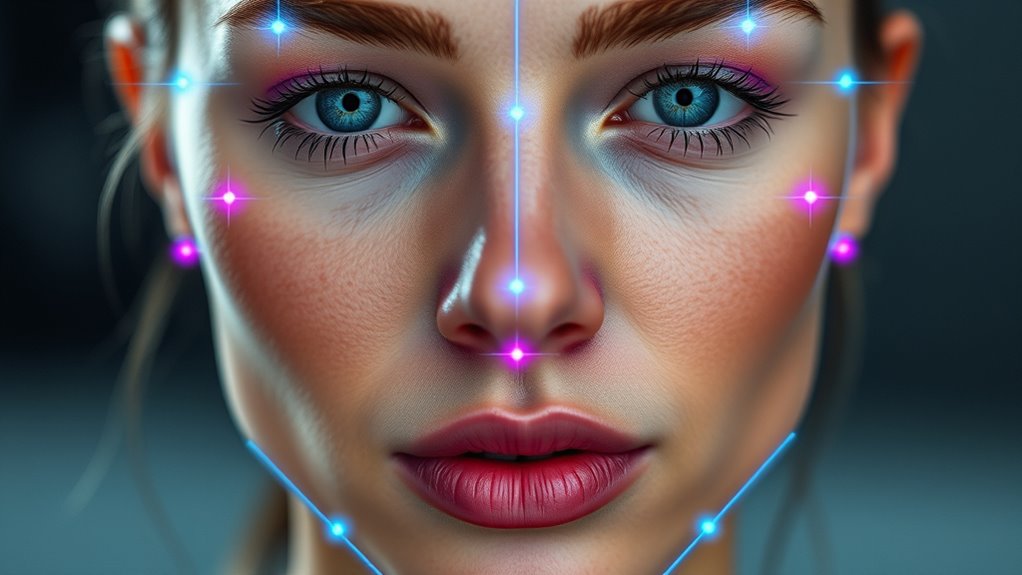
Have you ever wondered how your smartphone smoothly applies filters or tracks your facial expressions in real time? This seamless experience is made possible through advanced facial landmark tracking, a crucial component of modern 3D modeling and animation techniques. When you explore DIY CGI, understanding how these landmarks work can empower you to create realistic digital characters and animations without needing expensive software or equipment. The process begins with capturing key facial points—such as the corners of your eyes, the tip of your nose, or the edges of your mouth—and mapping them onto a digital model. This mapping enables your computer to interpret subtle movements, expressions, and gestures, making your virtual characters feel alive. Highly accurate tracking can be achieved through the use of accessible software and open-source tools, which analyze video feeds frame by frame, identifying specific facial features and tracking their positions over time. The real magic lies in how these tracked points inform the 3D modeling process. By mapping the landmarks onto a digital mesh, you can manipulate a character’s facial expressions or lip-sync animations with high precision. Animation techniques like blend shapes or rigging become more intuitive because the software adjusts the model based on real-time landmark data, reducing the need for manual keyframing. For DIY enthusiasts, this means you can create engaging animations by simply recording your face and letting the software do the heavy lifting. As you capture your expressions, the system applies animation techniques that translate your movements onto the digital model. This process not only saves time but also enhances the realism of your CGI projects. Whether you’re designing a character for a short film or an interactive game, facial landmark tracking allows you to add genuine emotion and personality without extensive technical know-how. It’s like giving life to your digital creations through clever integration of simple yet powerful animation techniques. By understanding the underlying principles of Dog breeds, you can better appreciate how different facial features and expressions can be modeled and animated authentically. In essence, mastering facial landmark tracking for your DIY CGI endeavors hinges on understanding how 3D modeling adapts to real-world facial movements. By using accessible tools to track and map landmarks, you can implement sophisticated animation techniques that make your characters more expressive and authentic. Incorporating kitchen concepts like textured textiles and natural materials can inspire creative ways to enhance the visual appeal of your projects. Additionally, research in sound healing science shows how sound vibrations can influence emotional responses, which can be creatively integrated into multimedia projects. This fusion of technology and creativity can be further strengthened by understanding the importance of skin health, as healthy skin provides a better surface for tracking facial landmarks and achieving realistic animations. This fusion of technology and creativity opens up endless possibilities for personal projects, allowing you to produce professional-quality animation without the need for complex rigs or expensive software. Embracing cybersecurity considerations when sharing your work online can help protect your creative assets from unauthorized use. With patience and practice, you’ll find that capturing and animating facial expressions becomes a fascinating, rewarding part of your CGI journey.
Amazon Product B075HN8537
As an affiliate, we earn on qualifying purchases.
Frequently Asked Questions
What Software Tools Are Best for Beginners?
If you’re starting out, look for software that balances tracking accuracy and software compatibility. Tools like FaceTracker or OpenCV are beginner-friendly, offering good tracking capabilities and easy integration with other programs. They often come with tutorials, making learning smoother. Choose software that matches your hardware and software setup to avoid compatibility issues. With the right choice, you’ll get reliable results without feeling overwhelmed, helping your DIY CGI projects succeed.
How Accurate Is Facial Landmark Tracking With Webcams?
Isn’t it true that even the clearest mirror can distort reflections? Webcam-based facial landmark tracking offers decent accuracy for capturing facial expressions, but tracking stability can vary. You might notice slight shifts or inconsistencies, especially in dynamic movements. While it’s a good starting point for DIY projects, don’t expect Hollywood-level precision—think of it as a sketch rather than a masterpiece. With practice, your tracking will improve, revealing more about your expressions.
Can Tracking Work With Live Video or Only Recordings?
You can absolutely use facial landmark tracking with live video, not just recordings. Modern software and algorithms support real-time processing, enabling you to track facial features instantly during live feeds. This means you get recording compatibility and live video tracking, making your DIY CGI projects more dynamic and responsive. Just guarantee your hardware meets the requirements for smooth real-time performance, and you’ll be able to work seamlessly with both live and recorded footage.
What Are Common Challenges in DIY Facial Tracking?
Imagine the challenge lurking behind DIY facial tracking—unstable results despite your efforts. You might struggle with facial expression variability, causing landmarks to shift unpredictably. Camera calibration becomes critical, yet tricky, affecting accuracy. These obstacles can make real-time tracking frustrating, risking misaligned CGI effects. Stay vigilant, fine-tune your calibration, and anticipate variability. With patience, you’ll release smoother tracking, turning these hurdles into stepping stones toward impressive, personalized CGI projects.
How Do Lighting Conditions Affect Tracking Accuracy?
Lighting variability critically impacts tracking accuracy because inconsistent or poor lighting can obscure facial features and create shadows, making it harder for your system to identify landmarks. To improve results, ensure your sensor is properly calibrated under different lighting conditions and use even, diffuse lighting whenever possible. This helps your tracking software maintain accuracy despite changes in ambient light, making your DIY CGI projects more reliable and professional-looking.
Amazon Product B0CHTFMM5G
As an affiliate, we earn on qualifying purchases.
Conclusion
By now, you realize how effective facial landmark tracking is for DIY CGI projects. Did you know that over 60% of amateur creators have improved their animations considerably using simple tracking techniques? With just a few tools and some practice, you can achieve professional-looking results without expensive software. Keep experimenting, and you’ll find that mastering facial landmarks opens up endless creative possibilities. So, plunge in and bring your digital characters to life with confidence!
Amazon Product B0F1ZGVCBS
As an affiliate, we earn on qualifying purchases.
Amazon Product B0FWFJ71R7
As an affiliate, we earn on qualifying purchases.