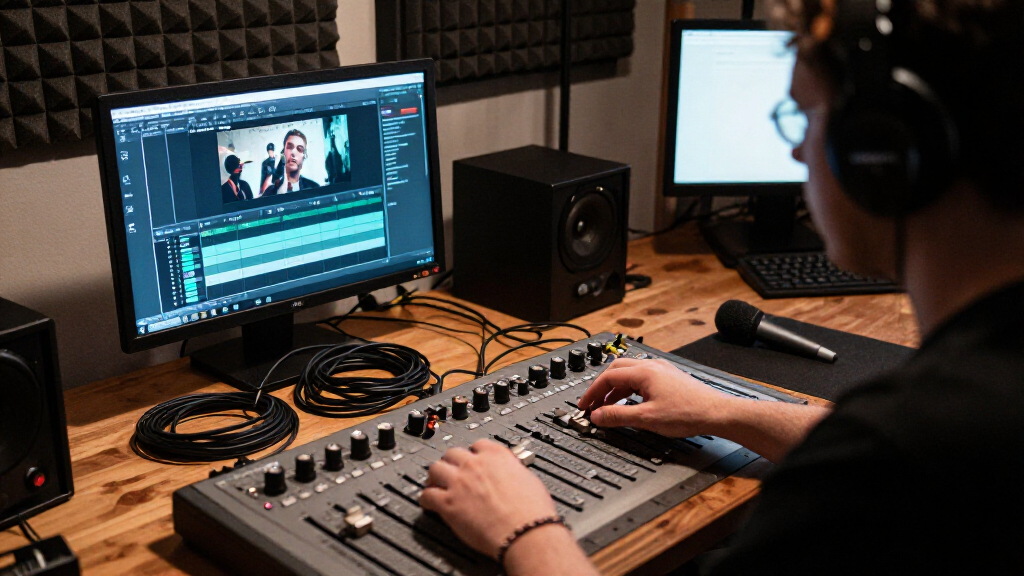
This checklist is for trailer fan filmmakers who want to capture dialogue and production sound with a more deliberate audio setup. It covers microphones, recording, and monitoring so you can consider the parts of a sound kit together.

Get movie nights delivered free with Prime
- Fast, free delivery on millions of items
- Prime Video, Amazon Music and more included
- Member-only deals all year
The sections follow practical roles: a shotgun microphone and wireless lavalier for capture, a portable recorder for recording, a boom setup for positioning, headphones for monitoring, and a windshield for microphone protection. Each pick is presented as one option for that slot, with points to check before buying.
Use the look-for lists to compare the product with your camera, recording workflow, and the way you plan to work on set. Check connections, included components, and fit in the full product listing; names alone do not confirm compatibility.
Shotgun Microphone
A shotgun microphone can fill the focused dialogue capture role in a trailer-film kit. The listed pick is the Sennheiser MKE 600 Professional Shotgun Microphone Kit. Before choosing it, consider where the mic will be mounted and how it will connect to your camera or recorder. A microphone that suits a boom workflow may need different accessories or setup than one mounted directly on a camera.
A common buying mistake is to treat the word “kit” as a guarantee that every item needed for your setup is included. Review the listing for the exact contents, connectors, and any required power or mounting details. Check compatibility with the recording device, and leave room in the setup for a windshield or shock mount if those are part of your plan. Confirm the full signal path before filming so the microphone, cable, and recorder can work together.
What to look for:
- Check connector compatibility with your camera or recorder.
- Review the kit contents and identify any missing mounting parts.
- Confirm the microphone’s power requirements for your setup.
- Consider how it will be positioned for dialogue recording.
Sennheiser MKE 600 Professional Shotgun Microphone Kit

The Sennheiser MKE 600 is a supercardioid/lobar shotgun microphone designed to capture focused dialogue while reducing off-axis noise. It supports phantom or AA battery power and includes a shock mount, wind protection, an XLR-to-3.5 mm adapter, and a storage pouch for camera or boom use.
Pros:
- Directional pickup helps isolate dialogue from surrounding noise
- Supports both phantom power and AA battery operation
- Includes shock mount, wind protection, and camera adapter
- Low-cut filter helps reduce handling and environmental rumble
Cons:
- Requires an adapter cable for direct 3.5 mm camera connection
- AA battery runtime is finite and requires battery replacement
Best for: Filmmakers building a boom or camera-mounted dialogue setup
Not ideal for: Buyers who have not confirmed their recorder connection
Bottom line: Choose the MKE 600 kit after checking its included accessories and compatibility with your recording chain.
Wireless Lavalier Microphone
A wireless lavalier can serve dialogue capture when a microphone needs to be worn rather than held overhead. The listed pick is DJI Mic 3 Wireless Microphone (2 Transmitters + 1 Receiver + Charging. The product name identifies a two-transmitter, one-receiver configuration, which may suit a workflow with multiple on-camera speakers, but check the listing for the complete product name and package details before ordering. Plan around your recording setup and how the receiver will connect to it.
A common mistake is assuming a wireless set will pair with every camera, phone, or recorder without adapters or configuration. Verify connector type, supported devices, included cables, and how the set is powered and charged. Also consider where transmitters will be placed and whether the wardrobe or scene allows discreet attachment. For a film shoot, test the complete route from transmitter to receiver to recording device before relying on it for a take. Compatibility and placement are central to getting usable dialogue from a wireless setup.
What to look for:
- Confirm the receiver works with your camera or recorder.
- Check which cables and adapters are included.
- Verify the number of transmitters and package contents.
- Consider how transmitters will attach to wardrobe.
- Review charging and power details for the planned shoot.
DJI Mic 3 Wireless Microphone (2 Transmitters + 1 Receiver + Charging Case)
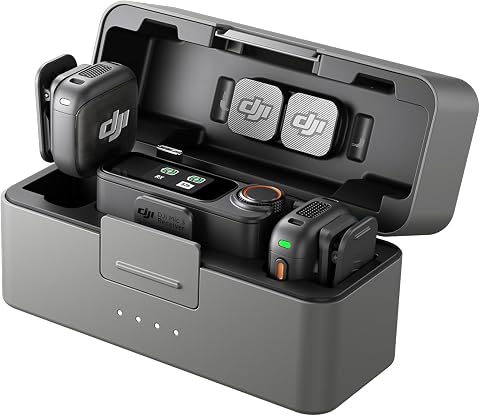
The DJI Mic 3 is a compact, lightweight wireless microphone system designed for on-the-go recording, featuring dual transmitters and a receiver with a charging case. It offers adaptive gain control, noise cancellation, dual-band interference protection, and internal 32-bit float recording for high-quality audio in various environments.
Pros:
- Compact and lightweight design for portability
- High-quality, crystal-clear audio with adaptive features
- Long battery life of up to 28 hours
- Supports multi-voice recording and backup
Cons:
- Requires familiarity with DJI ecosystem for full integration
- May be more expensive than basic wireless microphones
- Limited to compatible DJI devices for some features
Best for: Small crews recording dialogue from more than one speaker
Not ideal for: Setups without a compatible receiver connection
Bottom line: Check the complete package and device compatibility before building a shoot around this wireless set.
Portable Audio Recorder
A portable recorder provides a dedicated place to capture sound during production. The Zoom H6essential 6-Track Portable Recorder with 32-Bit Float is the listed pick for this role. Match its inputs and recording workflow to the microphones you plan to use, including whether you need to record more than one source at once. Input count and connection type matter more than a feature name if your microphones cannot connect as expected.
A common buying mistake is choosing a recorder without mapping out the whole session: microphones, cables, headphones, power, and how files will move into editing. Confirm what is included and what must be supplied separately. Check that your intended microphones can connect, that the recording format suits your editing workflow, and that you understand the controls before a shoot. The “32-Bit Float” wording is part of the product name; review the manufacturer details to understand how it fits your workflow. Test the full recording chain before recording a scene.
What to look for:
- Count how many microphone sources you need to record together.
- Confirm input and connector compatibility with each microphone.
- Review the included accessories and required power sources.
- Check file formats against your editing workflow.
- Learn the recording and monitoring controls before the shoot.
Zoom H6essential 6-Track Portable Recorder with 32-Bit Float

The Zoom H6essential records up to six tracks with 32-bit float audio, built-in stereo X/Y microphones, and four XLR/TRS inputs. It can also function as a USB audio interface while recording to an SD card, and includes spoken audio guidance for menu navigation.
Pros:
- 32-bit float recording helps prevent clipping
- Four combo inputs plus built-in stereo microphones
- Can record to SD card while functioning as a USB audio interface
- Spoken menu guidance supports accessible operation
Cons:
- Interchangeable capsules beyond the included microphones are optional
- Requires four AAA batteries
Best for: Crews recording multiple audio sources separately
Not ideal for: Buyers who have not matched inputs to microphones
Bottom line: Choose the H6essential after confirming its inputs and workflow fit your complete audio setup.
Microphone Boom Pole
A boom setup helps position a microphone while keeping the operator and equipment arranged around the shot. The listed pick is the Microphone Boom Arm Stand Kit with Shock Mount and Windscreen. Its name indicates a stand kit with a shock mount and windscreen, but the exact construction, reach, and included parts should be confirmed in the listing. Positioning and stability are key considerations when selecting support for a microphone.
A common mistake is assuming a stand or arm will reach the needed position and hold a particular microphone securely. Check the product dimensions, mounting thread, adjustment range, and any stated load limits. Confirm the shock mount fits the microphone and that the windscreen is suitable for its shape. Consider where the stand will sit relative to the camera frame, performers, and crew movement. Fit the complete assembly—microphone, mount, and wind protection—before relying on it during a take.
What to look for:
- Check reach, height, and adjustment range in the listing.
- Confirm the stand or arm’s mounting thread and fit.
- Verify the shock mount fits your microphone.
- Review stated load limits and stability details.
- Check the windscreen’s dimensions against the microphone.
Microphone Boom Arm Stand Kit with Shock Mount and Windscreen

This adjustable steel boom arm rotates 360° and supports microphones weighing up to 1.5 kg. The kit includes a shock mount, desk clamp with an anti-scratch pad, and a foam windscreen to help reduce vibration, plosives, and wind noise during recording or broadcasting.
Pros:
- Adjustable arm with 360° rotation
- Shock mount helps reduce vibration noise
- Desk clamp has an anti-scratch pad
- Includes a foam windscreen
Cons:
- Windscreen is specified for the Audio-Technica AT2020 microphone
- Clamp fits desks up to 2.4 inches thick
Best for: Setups that need a stand and microphone support accessories
Not ideal for: Buyers who need a verified handheld boom pole
Bottom line: Confirm the kit’s dimensions, mount fit, and stability for your intended microphone position.
Headphone Monitor
Headphones give a filmmaker a way to monitor recorded sound during setup and takes. The listed pick is the beyerdynamic DT 990 Pro X (48 Ohm), Open-Back Studio Headphones, Black. Before choosing it, consider where monitoring will happen and whether an open-back design suits that environment. Monitoring conditions and connection should guide the fit for your production workflow.
A common buying mistake is focusing only on the headphone model while overlooking the device that will drive it and the listening conditions on set. Confirm the plug and any adapter needs for your recorder or camera, and check whether the headphone design is suitable around other people or in a noisy location. Consider comfort for the length of your sessions and whether the cable arrangement works with your position. Use the recorder or camera’s monitoring output to check dialogue and unwanted noise before and during recording. Test with your actual device so you know the connection and listening level work for you.
What to look for:
- Confirm the headphone connection fits your monitoring output.
- Check whether an adapter is required.
- Consider open-back listening in your usual recording environment.
- Review cable length and how it fits your position.
- Try the fit for the duration of a typical session.
beyerdynamic DT 990 Pro X (48 Ohm), Open-Back Studio Headphones, Black

The beyerdynamic DT 990 Pro X are open-back studio headphones designed for critical listening, mixing, and editing. They feature a 48-ohm drive for full volume without an amp, a high-resolution STELLAR.45 driver, and a natural soundstage for accurate monitoring.
Pros:
- Full volume from any source without needing an amplifier
- Open-back design provides natural soundstage for mixing and critical listening
- High-resolution driver offers detailed and accurate sound
Cons:
- Open-back design may leak sound and reduce privacy
- Requires wired connection, limiting mobility
- Limited to studio or quiet environments due to open-back design
Best for: Editors or crews monitoring from a compatible output
Not ideal for: Locations where open-back listening is impractical
Bottom line: Check the connection and listening environment before selecting these headphones for production monitoring.
Microphone Windshield
Wind protection can be an important part of a microphone setup, and the listed pick is the Microphone Windshield Pop Filter and Isolation Ball. The product name combines several kinds of accessories, so check the listing carefully to see what is included and how the parts are intended to be used. Microphone fit and intended use determine whether this item works for your setup.
A common buying mistake is assuming that a pop filter, windshield, and isolation accessory are interchangeable or will fit every microphone. Compare the product dimensions and mounting method with the microphone you plan to use, and check whether it can be used alongside the shock mount or boom support. Consider how the accessory affects access to controls and placement within the shot. Look for clear information about compatible microphone shapes and included attachment parts. Verify each component separately before treating the product name as a complete compatibility guide.
What to look for:
- Check dimensions against the microphone body.
- Confirm the mounting method and included attachment parts.
- Review which components are included in the package.
- Check whether it fits alongside your shock mount or stand.
- Match the accessory to the recording conditions you expect.
Microphone Windshield Pop Filter and Isolation Ball

This portable foam isolation ball has a five-sided design and a double-layer pop filter to help reduce plosives, wind noise, and sound reflections during recording. It fits microphones with removable jackets 50–75 mm in diameter and can be mounted on desktop stands, tripods, boom arms, or floor stands.
Pros:
- Helps reduce plosives, wind interference, and reflections
- Fits a range of microphone sizes
- Lightweight and portable
- Compatible with several types of stands
Cons:
- Compatibility is limited to microphones with removable jackets 50–75 mm in diameter
- The listed USB connectivity and corded power may not apply to a passive acoustic filter
Best for: Buyers seeking multiple microphone accessories in one listing
Not ideal for: Anyone needing a confirmed fit without checking dimensions
Bottom line: Review the contents and fit for each accessory before pairing this item with your microphone.
Build the kit in the order that solves your most immediate recording needs: first choose a microphone and compatible recording device, then add the connections and support needed to use them. Next consider wireless capture, monitoring headphones, and wind protection based on the scenes you plan to record. Compatibility comes first; confirm the complete signal path and included parts before filling gaps with accessories.
You do not need to assemble every part at once. Start with a setup you can connect and operate confidently, then expand as your trailer shoots call for more recording options. Check product details against your camera, recorder, and microphone before buying, and test the assembled kit ahead of filming. A prepared audio setup makes it easier to focus on the scene.
Halloween Picks
halloween
As an affiliate, we earn on qualifying purchases.