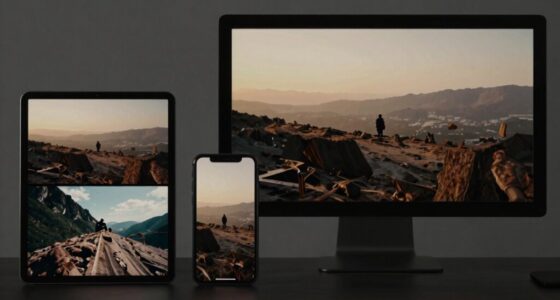

To optimize trailers for mobile viewing, focus on creating responsive designs that adapt smoothly to various screen sizes and orientations. Compress your videos using suitable codecs to reduce file size without sacrificing quality, ensuring fast load times and smooth streaming even on slower connections. Use adaptive streaming technologies to deliver the best quality based on network conditions. Keep your resolution and bitrate balanced for clarity and performance. If you want to improve your mobile trailer experience further, you’ll find useful tips below.
Key Takeaways
- Use responsive design techniques to ensure trailers adapt seamlessly to various screen sizes and orientations.
- Implement video compression with codecs and optimized settings to reduce file size without quality loss.
- Utilize adaptive streaming technologies to automatically select the best quality based on device and network conditions.
- Optimize resolution and bitrate for faster load times and smoother playback on mobile networks.
- Test trailers across multiple devices and connection speeds to identify and fix potential viewing issues.
Have you ever tried watching a movie trailer on your phone and found it less than satisfying? Maybe the video stuttered, the image was blurry, or it took forever to load. That’s because mobile viewing presents unique challenges that require special attention to how trailers are designed and delivered. To guarantee your trailers look great and perform smoothly on any device, you need to focus on responsive design and effective video compression. These two elements are essential for delivering a seamless viewing experience that keeps your audience engaged.
Responsive design is all about making sure your trailer adapts to any screen size. When viewers access your trailer on different devices—smartphones, tablets, or small laptops—you want the experience to be consistent and optimized. Responsive design involves flexible layouts, scalable images, and adaptable video players that automatically adjust to the device’s resolution and orientation. This prevents awkward cropping or black bars, ensuring the trailer fills the screen perfectly. When your trailer uses responsive design principles, viewers won’t have to zoom in or struggle with awkward framing—everything will be clear, sharp, and easy to watch.
Responsive design ensures your trailer fits any screen size perfectly for a seamless viewing experience.
Alongside responsive design, video compression plays a fundamental role in mobile viewing. High-quality videos often come with large file sizes, which can cause long loading times and buffering issues on mobile networks. Video compression reduces the file size without sacrificing too much quality, so your trailer loads faster and streams smoothly. By choosing the right codecs and compression settings, you strike a balance between visual fidelity and performance. This is especially important for viewers on slower or unreliable internet connections. Proper compression also minimizes data usage, making it more comfortable for viewers who have limited data plans. In essence, compressed videos ensure your trailer is quick to load and plays without interruption, increasing the chances that viewers will watch it all the way through. Incorporating video codecs into your compression strategy can significantly enhance playback quality on various devices.
Implementing these strategies means testing your trailers across a variety of devices and network conditions. Use adaptive streaming technologies, which automatically select the best quality version based on the viewer’s connection speed. Keep your file sizes as small as possible by optimizing resolution and bitrate, without losing the impact of your visuals. When you combine responsive design and video compression, you create a mobile viewing experience that’s fast, clear, and engaging. This not only helps your trailers reach a wider audience but also ensures they leave a lasting impression. After all, when your trailers look and perform their best on mobile devices, viewers are more likely to share, discuss, and become excited about what’s coming next.
responsive video player for mobile
As an affiliate, we earn on qualifying purchases.
As an affiliate, we earn on qualifying purchases.
Frequently Asked Questions
How Can I Improve Trailer Load Times on Mobile Devices?
To improve trailer load times on mobile devices, start by using video compression to reduce file sizes without sacrificing quality. Implement adaptive streaming so your trailer dynamically adjusts to the viewer’s internet speed, ensuring smooth playback. Optimize your video hosting platform for fast delivery, and consider a content delivery network (CDN) to minimize latency. These steps will provide a quicker, smoother experience, keeping viewers engaged from the first second.
What Are the Best Formats for Mobile Trailer Videos?
To guarantee your trailer looks its best on mobile, opt for MP4 format using H.264 video compression, which balances quality and file size effectively. Keep aspect ratios like 16:9 or 4:3 consistent to prevent awkward cropping or black bars. This approach streamlines playback, reduces load times, and enhances viewer engagement, making your trailer more appealing across various devices. Remember, a well-chosen format reflects your attention to detail.
How Do I Reduce Data Usage When Streaming Trailers?
To reduce data usage when streaming trailers, you should use compression techniques that lower file size without sacrificing quality. Opt for lower resolution or bitrate settings, and enable data management features on your device or streaming app to limit automatic downloads or high-quality streaming. This way, you conserve data, enjoy smooth viewing, and still get the trailer experience you want. Adjusting these settings makes streaming more efficient and cost-effective.
Which Mobile Devices Have the Best Trailer Viewing Experience?
Imagine a perfect window into cinematic worlds—certain mobile devices deliver this best. You’ll find that flagship smartphones like the iPhone 15 and Samsung Galaxy S23 excel due to their superior screen resolution and ergonomic design, making trailer viewing immersive and comfortable. These devices offer vibrant displays and easy handling, ensuring your experience is cinematic quality wherever you go. For the best trailer viewing, prioritize devices with high resolution and ergonomic comfort.
How Can I Ensure Trailers Are Compatible Across All Mobile Platforms?
To guarantee trailers are compatible across all mobile platforms, you should implement a responsive design that adapts seamlessly to different screen sizes and orientations. Test your trailers on various devices and operating systems to verify platform compatibility. Use widely supported video formats like MP4 and optimize compression settings for quick loading. Regularly update your content to account for evolving mobile technologies, ensuring a consistent, high-quality viewing experience everywhere.
video compression codecs for streaming
As an affiliate, we earn on qualifying purchases.
As an affiliate, we earn on qualifying purchases.
Conclusion
Now that you know how to optimize trailers for mobile viewing, imagine the impact of your next clip. Will your audience be hooked from the first second, eager to see more? The secrets to captivating mobile viewers are within your grasp—are you ready to reveal them? Keep experimenting, stay creative, and watch your trailers transform. The future of mobile engagement is just a click away—are you prepared to take the leap and leave your viewers craving more?
adaptive streaming technology devices
As an affiliate, we earn on qualifying purchases.
As an affiliate, we earn on qualifying purchases.
As an affiliate, we earn on qualifying purchases.